
Is Chewbacca the best co-pilot in movie history? We would vote for Chewie over Goose all day long. As sidekicks go, he had over 200 years of flight experience, knew his role, and did it well.
Organisations have the opportunity to pair staff with AI companions, creating partnerships to turn words into a powerful productivity tool.
Privacy by design: What sets Copilot apart
We have had many enquiries asking us how organisations can leverage the power of AI, while safeguarding employees and their data.
A key point of difference between other AI tools and Microsoft 365 Copilot is data privacy. Just like you trust Outlook not to expose your emails to other tenants, Copilot is built with the same enterprise-grade protections. It’s not a consumer chatbot – it’s a secure productivity tool embedded in your Microsoft ecosystem.
Latest updates: How to use Copilot
Video: How to use Copilot for Microsoft 365
Copilot for Microsoft 365 combines the power of large language models (LLMs) with your data in the Microsoft Graph—your calendar, emails, chats, documents, meetings, and more—and the Microsoft 365 apps.
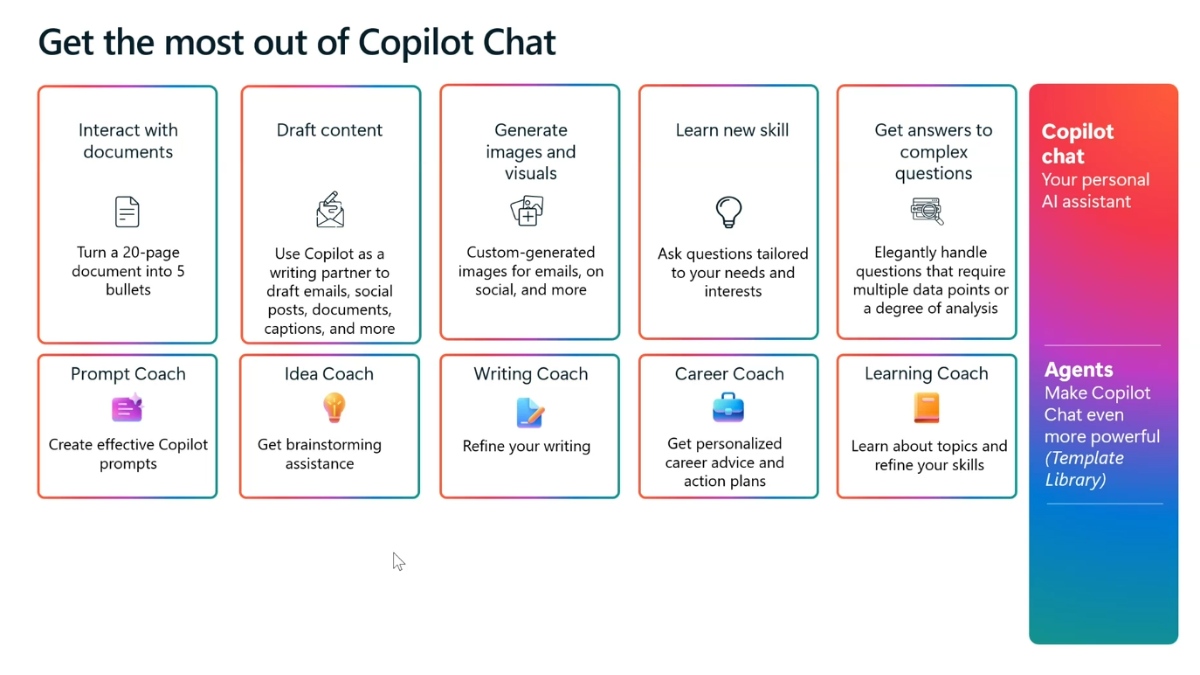
Top 3 features of Copilot
1. AI-powered assistance across Microsoft 365 Apps
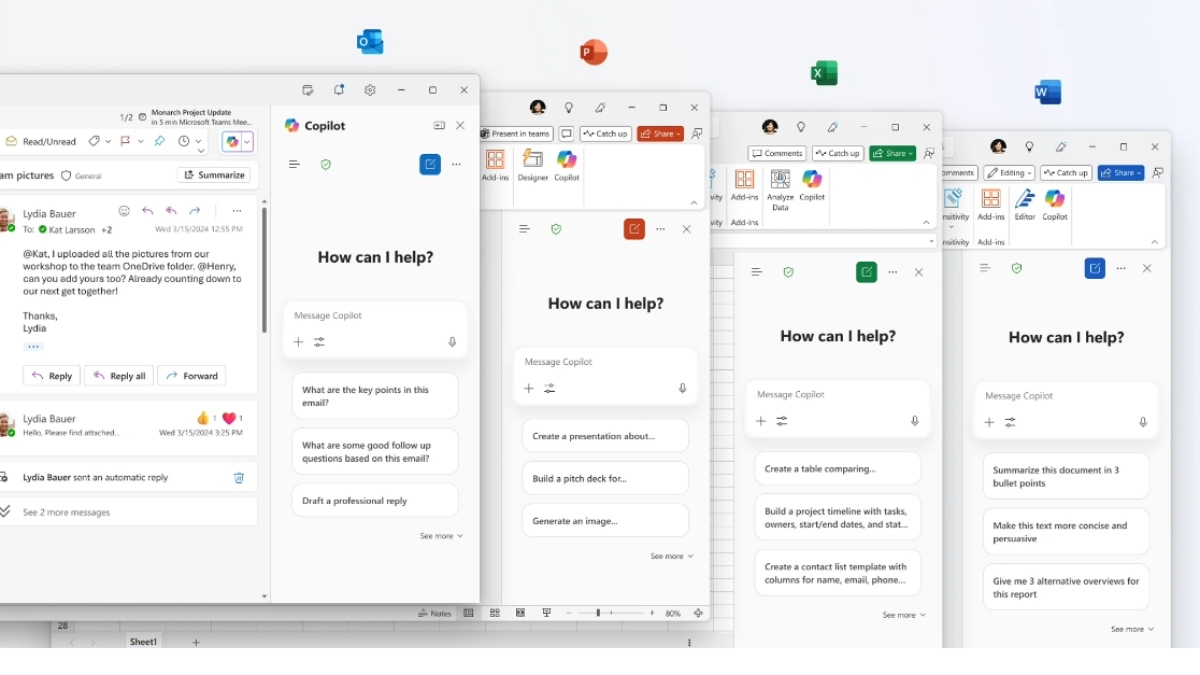
Copilot is embedded directly into Word, Excel, PowerPoint, Outlook, and Teams—so you can:
- Draft documents, emails, and presentations with natural language prompts.
- Summarise meetings, emails, and chats instantly.
- Analyse data in Excel without writing formulas.
There is a learning curve in writing effective prompts. This online guide is a valuable resource for developing your prompt skills.
2. Enterprise-grade security and privacy
Unlike consumer AI tools, Copilot is built on Microsoft’s trusted security stack:
- Your data stays within your Microsoft 365 tenant.
- Complies with industry standards like GDPR and HIPAA.
- Inherits the same protections as Outlook, SharePoint, and Teams.
3. Customisable workflows with Copilot Studio
Copilot Studio lets you build tailored AI agents and automate business processes:
- Connect to internal systems like SAP, ServiceNow, or Snowflake.
- Create agents for HR onboarding or sales insights.
- Use low-code tools to design workflows without needing developers

Impact by workflow
Microsoft 365 Copilot is transforming business workflows across departments by embedding AI directly into the tools employees use every day. Here’s a breakdown of its impact by workflow:
🧠 Knowledge Management & Search
- Copilot Chat & Researcher: Employees can ask natural-language questions to find policies, documents, or updates across Microsoft 365 and connected systems like SharePoint.
- Impact: Reduces time spent searching for information, minimises duplication, and ensures teams work with the latest data.
📊 Data Analysis & Reporting
- Excel Agent Mode: Users can generate financial reports, loan calculators, and budget trackers using simple prompts. Copilot iteratively refines outputs, checks results, and applies best practices.
- Impact: Democratises access to advanced Excel features, enabling non-experts to perform complex data modelling and analysis.
📝 Document Creation & Communication
- Word Agent Mode: Turns writing into a conversational process. Copilot drafts content, suggests edits, and asks clarifying questions to improve quality.
- Outlook Integration: Summarises email threads, drafts personalised replies, and helps manage inboxes efficiently.
- Impact: Speeds up writing tasks, improves clarity, and enhances communication across teams.
📈 Sales & Marketing
- Proposal Generation: Copilot helps craft compelling client proposals and presentations in Word and PowerPoint.
- Impact: Accelerates deal cycles and improves the quality of client-facing materials.
🧑💼 HR & Onboarding
- New Starter Agents: Automate onboarding workflows, generate welcome emails, and guide new hires through checklists.
- Impact: Streamlines HR processes and improves employee experience from day one.
🛠️ IT & Operations
- Helpdesk Automation Agents: Handle routine IT queries, automate ticket triage, and surface relevant troubleshooting steps.
- Impact: Reduces support load and improves response times.
🧪 Custom Workflows & Integration
- Copilot Studio & Agent Store: Businesses can build custom agents or use partner-built ones (e.g., Snowflake Cortex, Asana) to automate niche workflows like inventory analysis or project tracking.
- Impact: Enables tailored AI solutions with enterprise-grade governance and control.
Free versus licensed
Microsoft 365 Copilot offers a free version (available with a Microsoft 365 subscription) and a more powerful licensed version grounded in your work environment.
The primary difference between the free versions of Microsoft Copilot and the licensed Microsoft 365 Copilot is the depth of integration with your work data and applications.
Data access in the free version: It is primarily web-grounded. It searches the public internet for information. It has limited awareness of open files (such as Word documents or Excel spreadsheets) to help with drafting or summarising that specific file, but it doesn’t connect to your broader work environment.
Data access in the licensed version: This is the major value proposition—it has full access and grounding in your organisation’s data via the Microsoft Graph. It operates Microsoft 365 tenant and respects your existing security, compliance, and privacy policies (e.g., file permissions, data residency). This is critical for business use.
Free Copilot (built inside Microsoft 365 Apps)
The free version is available to all Microsoft 365 users and offers basic AI features within individual apps. It’s mainly a standalone chat interface (web, Windows, or mobile app).
✅ Features:
- AI assistance in Word, Excel, Outlook, PowerPoint, and Teams
- Tasks like rewriting text, summarising emails, and generating content
- Works only within the app you’re using
🚫 Limitations:
- No access to organisational data (e.g. SharePoint, OneDrive, Teams chats)
- No cross-app intelligence or context awareness
- No Copilot Studio for building custom workflows or agents
- No enterprise-grade security controls beyond standard app protections
Licensed Copilot (add-on option)
This is the paid add-on license, plus a qualifying M365 subscription.
Ask it questions like, “Summarise the last three meetings I had with the HR team and draft an email to my manager outlining the next steps.” It pulls this information securely from your Teams, Outlook, and OneDrive files.
It includes a ‘Work/Web’ toggle in the chat interface to specify if it should search your internal work data or the public internet.
✅ Features:
- Deep integration with your organisation’s data across Microsoft 365
- AI grounded in Microsoft Graph—understands your files, meetings, chats, and emails
- Access to Copilot Studio to build custom agents and automate workflows
- Enterprise-grade security, compliance, and privacy
- Advanced features like Copilot Lab, Copilot in Loop, and Copilot in Teams
💼 Ideal for:
- Businesses needing secure, scalable AI across departments
- Teams that want AI to understand internal context and automate tasks
- IT admins who need control over data access and governance
How to buy Microsoft 365 Copilot
The full-featured version is designed for businesses is available as an add-on to Microsoft 365 E3/E5 licences.
You can purchase it from a Microsoft Partner like Boost IT on a monthly or annual subscription.
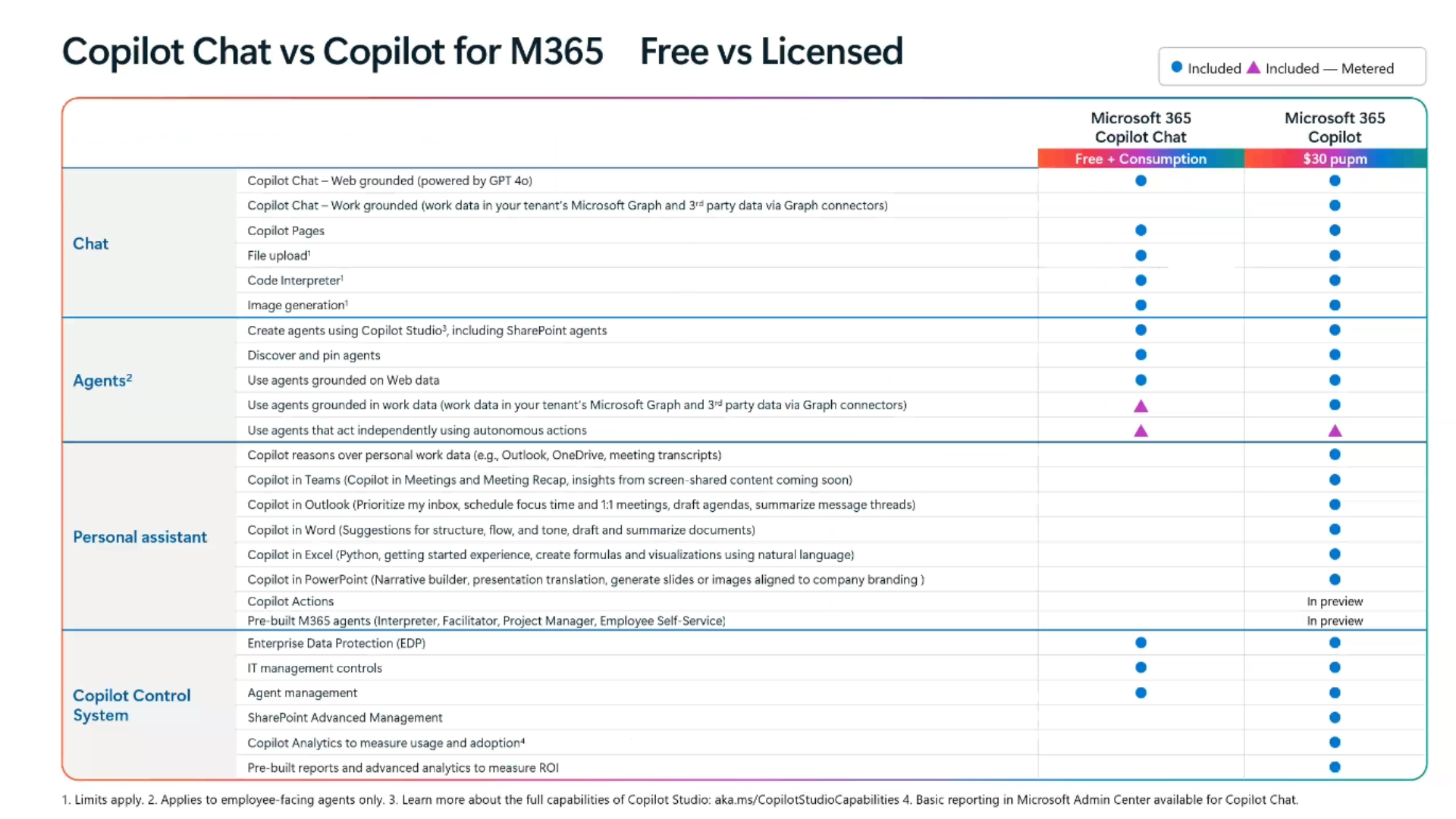
Image: Click image above to expand to view free vs licensed features